
Deployment With Docker Compose

Like most software, containerized applications should use a repeatable release process (i.e., a pipeline) that can deploy containers across multiple testing and production environments.
BuildMaster's Docker Operations, Docker Compose Files, and Docker Compose Deployment Operations make it easy to tag and push container images, as well as stop and start containers using sensitive, environment-specific configuration.
What is a "Compose File"?
Docker Compose Files are a BuildMaster 2026 Feature.
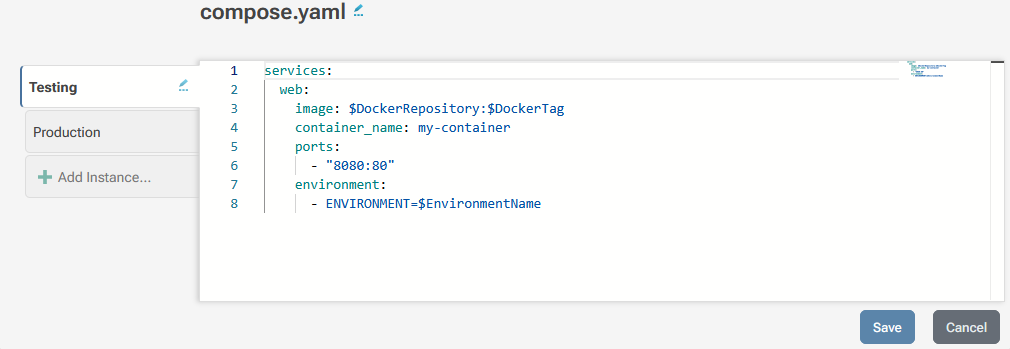
A "Docker Compose File" is a special type of application configuration file that's designed to work with BuildMaster's Docker::Compose-DeployComposeFile operation.
Using Docker Compose Files are not required, and you can use BuildMaster's Docker Compose Operations for more advanced scenarios.
Configuration Instances & Environments
A Docker Compose File has multiple "instances" with different configurations based on the environment you'll deploy to. You can control who has access to view or edit these instances based on environment.
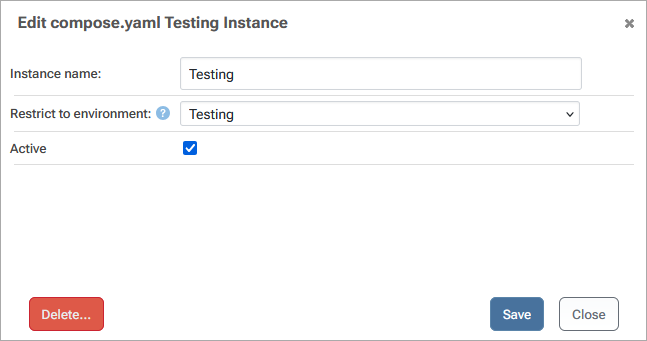
Each instance will show up as "tab" when you edit a Docker Compose File, and each tab will contain a separate Docker Compose YAML.
This approach is best used when you have a more advanced deployment options than what the Docker Run Config offers or if you have multiple images to deploy.
Creating a Docker Compose File
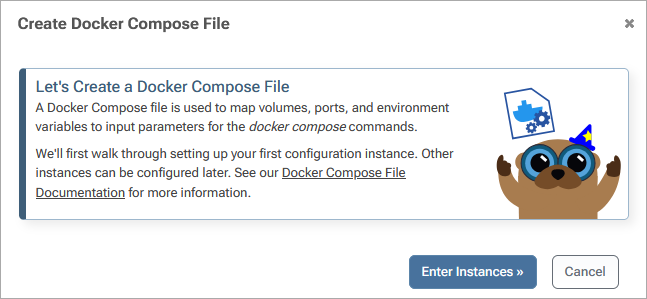
To create a Docker Compose File, click on "Docker Compose Files" under the Docker menu of your application, and then click "Create Docker Compose File" in the upper right hand corner. If you don't see these options, you may need to enable Docker under Build/Release features in the Settings menu of your application.
Using Docker Compose Files to Deploy
The easiest way to deploy a container image using Docker Compose is with the "Deploy via Docker Compose" Script Template.
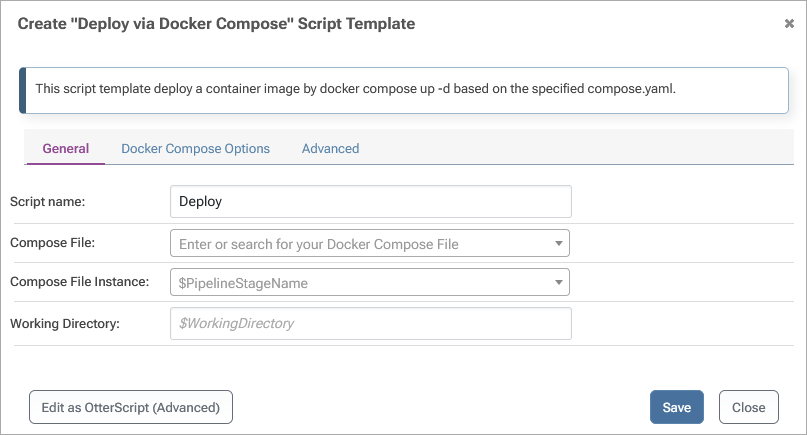
This script template uses a Docker Compose File to deploy the Docker image associated with the current build. This association automatically happens at build time, and the script uses the values of $DockerRepository and $DockerTag.
The deployment logic is as follows:
- Deploy the Docker Compose File
- Use
docker up -dto pull and start the containers
Like all Deployment Scripts Templates, you can convert to OtterScript for more advanced properties and scenarios.
BuildMaster Deployment Operations
BuildMaster Docker Compose operations are designed to work with a Docker Repository that you've connected to your application. This repository can be connected to credentials that can be used to authenticate using Docker::Login (docker login) to the registry where the image is hosted.
In general, we recommend having one Docker Repository per application in BuildMaster, and one image per build. But you can connect as many repositories to your application as needed, and build as many images as you'd like.
However, because a build can only be associated with one repository, you won't be able to rely on values of $DockerRepository and $DockerTag in your Docker Compose Files, build scripts, and deployment scripts.
All of the Docker operations allow you to override the DockerExePath and force whether "Docker on WSL" should be used (UseWsl).
Operations
Docker::Compose-DeployComposeFiledeploys a Docker Compose file stored in BuildMaster.Docker::Compose-Uprunsdocker compose up -don the specified compose file.Docker::Compose-Downrunsdocker compose downon the specified compose file.Docker::Compose-Execruns commands on currently running containers that were started using Docker::Compose-Up.Cocker::Compose-Runstarts a new container for the specified service in the compose file and runs a command.
Operation parameters may vary based on your version of BuildMaster. For the operation details for your version of BuildMaster, see the parameter specifications in Administrations -> Operations.