
Vulnerability Scanning & Assessment

ProGet can identify vulnerabilities in open-source packages, assess the exploitation risk in your environment, and help you decide which actions to take and when. This lets you monitor vulnerabilities across your CI/CD pipeline and production environments, and optionally block risky packages from being downloaded.
This article explains how vulnerability detection works and how you can configure blocking rules and assessments when a package is found to be vulnerable.
Package Vulnerabilities
When a package has a vulnerability, you'll see a message on the overview page indicating the risk posed.

You can also see all vulnerabilities detected in packages under the SCA & Reporting tab.
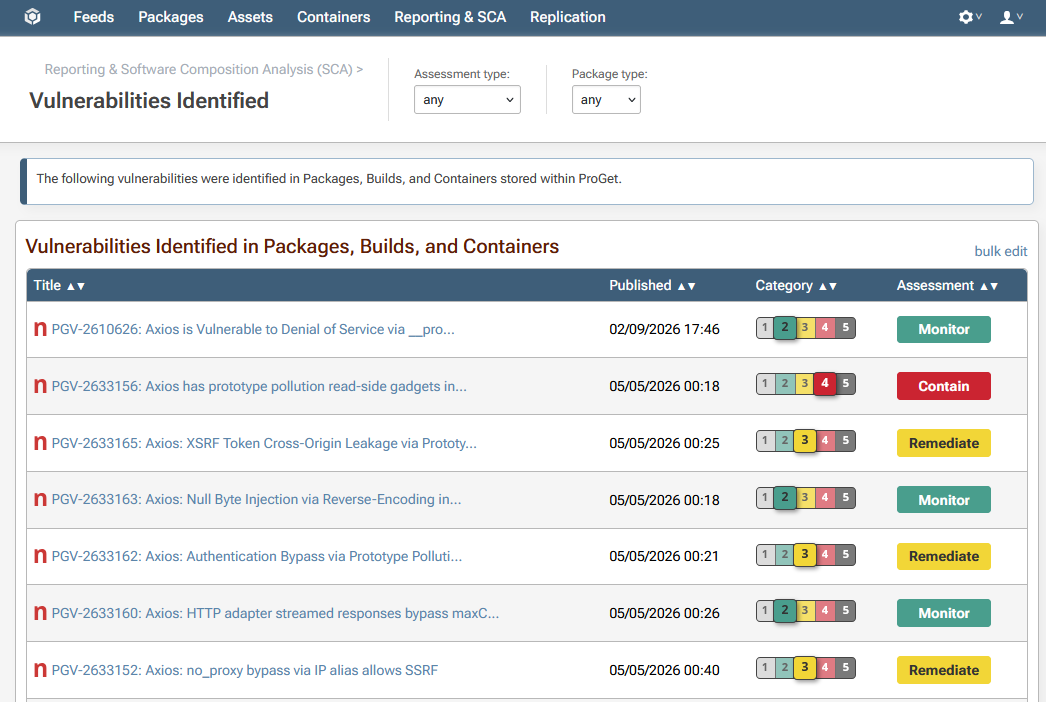
Clicking on an entry will provide technical details about the vulnerability itself, the impacted packages and builds, and context-specific assessments with recommended action.
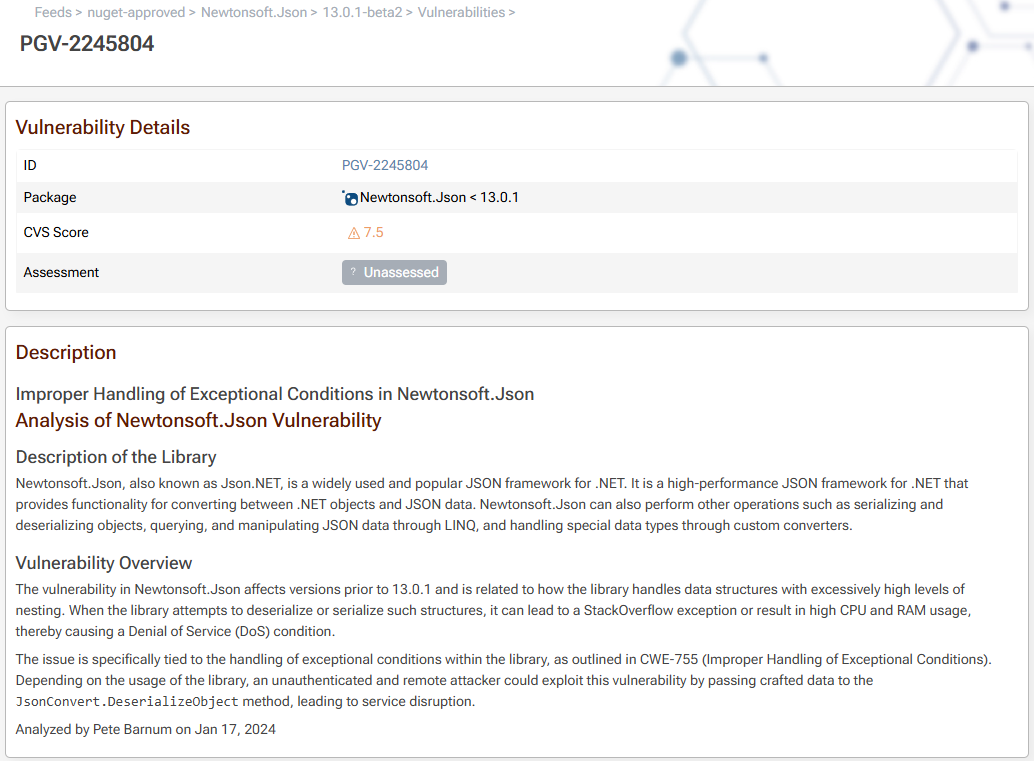
ProGet uses PVRS Categories to provide you with actionable, context-specific guidance on how to respond to each vulnerability. These range from Category 1 (No special action required because exploitation not practically possible) to Category 5 (Address ASAP because risk is immediate and unacceptable).
See What is PVRS & PVRS Categories? to learn more.
Blocking Vulnerable Packages
If you have a paid version of ProGet, you'll scan and block packages so that packages like this can't be used as well as assess vulnerabilities and comment as to why they're severe or okay for your organization.
Blocking Downloads
You can also block downloads of the package file itself by navigating to Feed > Policies & Blocking, and selecting "Change Blocking Settings".

::info (Note: Configuring Download Blocking)
Note that download blocking is not configured by default. To block downloads select "Block noncompliant packages" in "Configure Download Blocking".
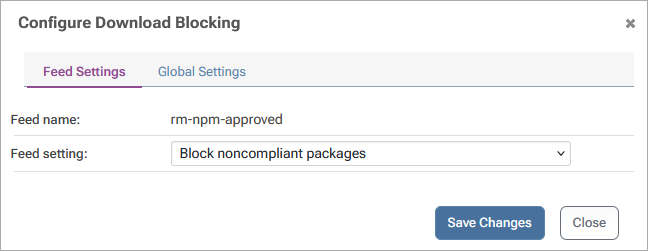
Non compliant packages will then be blocked from being downloaded.
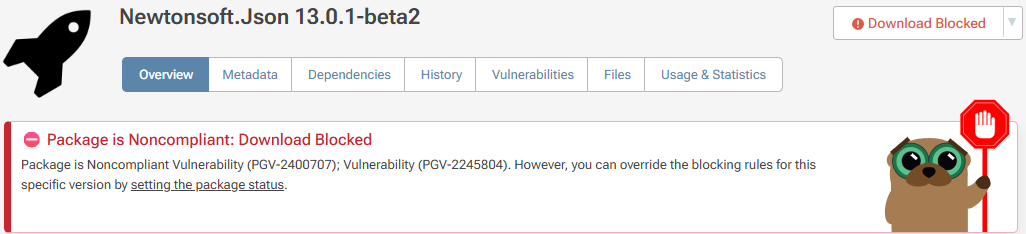
When enabled on a feed, users will not be able to download blocked packages from the UI or use the API. Attempts to download the package from the API will result in a 404 error when:
- A vulnerability was assessed as severe enough to prevent downloads
- The vulnerability is unassessed, and you enabled the "block unassessed" rule on the feed
Download blocking prevents packages with known vulnerabilities from being downloaded, but it may yield an undesired developer experience and it will not address packages already in production. We recommend focusing on scanning and auditing builds at the build and release stage using pgutil. This gives visibility into what's in each build and surfaces vulnerabilities with enough context to act on them.
See Blocking & Containing Vulnerable Packages to learn more.
Container Vulnerabilities
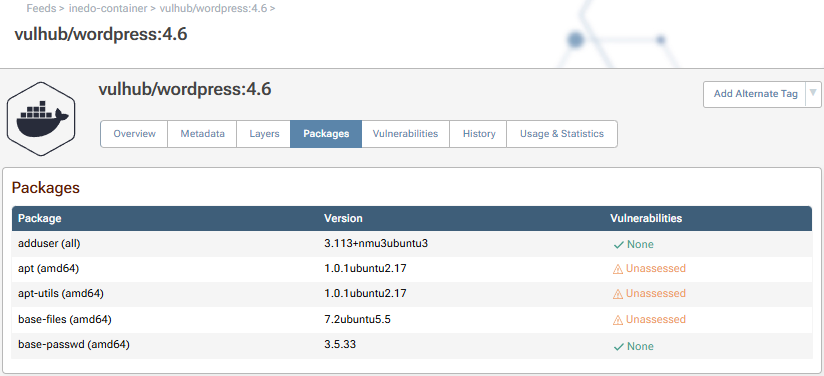
To scan containers for vulnerabilities, ProGet extracts and inspect the files within each container image layer and looks for vulnerable packages that are installed. The "Packages" and "Vulnerabilities" tab of a container image will show these:
Vulnerability Assessments
ProGet automatically assesses vulnerabilities with an assessment type that's intended to indicate the recommended response:
- Monitor: No immediate action is required. In previous versions of ProGet, this was labeled as "Ignore".
- Remediate: Plan to address the vulnerability in a scheduled release. This used to appear in ProGet as "Caution".
- Contain: Investigate the impact of the vulnerability and address as soon as reasonable. This used to appear as "Blocked".
See Understanding ProGet's Three Assessment Types to learn more about these responses.
Overriding Assessments
Even though your organization's risk profile is to assess vulnerabilities, you may wish to override the automatic assessments based on how your applications are used, and the real-world impact of the vulnerability in your environment.
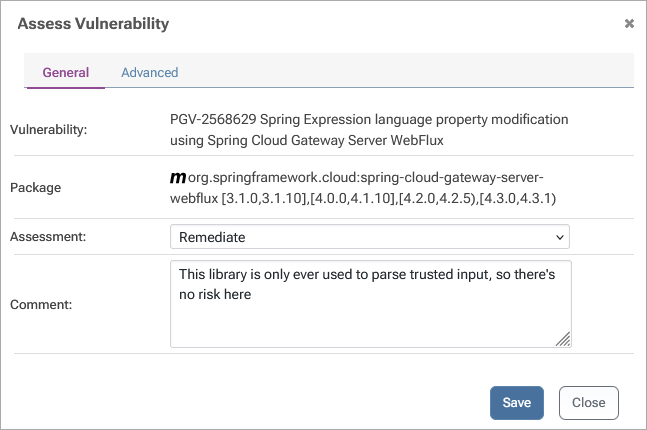
Note that this functionality is limited to paid editions of ProGet. See Overriding Assessments & Default Behavior to learn more.
Creating Your Own Assessment Types
You can create your own assessment types or edit the built-in ones. This isn't appropriate for most organizations, but it can be helpful if you need to adding more granular types (such as ones that map to all five PVRS categories), or if you wish to implement a manual review for severe vulnerabilities instead of auto assessing them as "Contain".
Custom assessment types should only be created when there is a clear and intentional process behind them. See Overriding Assessments & Default Behavior to best practices for doing this.
To create a custom assessment type, navigate to "Administration" > "Vulnerabilities & Assessment Types" and select "Create Custom Assessment Type".
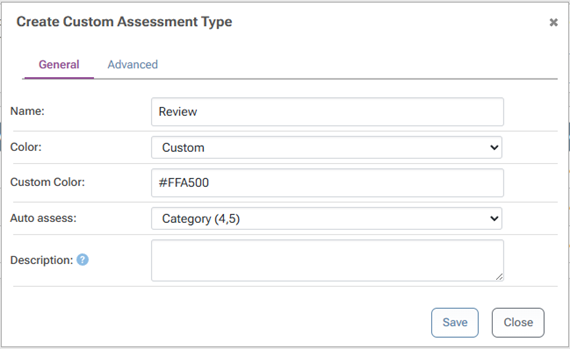
There are several options to consider when creating types:
- Apply to allows you to use PVRS Category or CVSS Scores to determine assessments
- Default expiry will cause the assessment to be considered "unassessed" after that many days, and unassessed vulnerabilities are considered Noncompliant by default
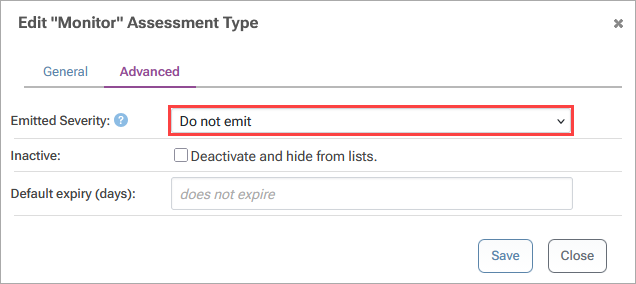
- Emitted severity controls whether or not vulnerabilities are emitted as part of the API and how default policy behavior in ProGet.
Emitted Severity is intended to automatically suppress noisy alerts from client tools like Visual Studio or npm, so that developers aren't constantly prompted to upgrade dependencies.
Malicious Packages
ProGet will also detect and automatically block known Malicious Packages.
Unlike a package with unintentional vulnerabilities (defects) that may open your applications to security exploits if used in a certain way, a malicious package is always unsafe to use because it was intentionally crafted to cause harm. As such, this blocking is automatic and cannot be configured.
In the unlikely event you need to override this behavior, you will need to:
- Acquire a copy of the package file
- Publish it to the feed
- Set the Package Status to "Always Allow Download"
Malicious Package Database
ProGet is installed with a malicious package database that contains the names/versions of hundreds of thousands of known packages.
By default, this database is updated on a nightly basis by downloading an update from Inedo Security Labs. You can see the status of the database under Admin > Vulnerabilities & Assessment Types > Databases
Malicious Packages & Compliance
A malicious package is always considered noncompliant. In the unlikely event you'd want to override this behavior, you can work-around this behavior by publish a copy of the package to a feed and setting the Package Status to "Always Allow Download".
This means that:
- if a malicious package is included in a Build, the build will always be considered noncompliant
- if a malicious package is found in a feed, it will trigger notifiers as appropriate
ProGet 2025 and earlier
As the security and vulnerability management practices evolved over the years, so has ProGet. While earlier versions of ProGet will behave differently than what's documented here, the functionality and workflows remain conceptually similar.
See the archived documentation (github.com) to understand how earlier versions functioned, as well as the ProGet 2026 Upgrade Notes to learn what changed recently.